|
WaysOnline(网联在线)的主要目的: |
| |
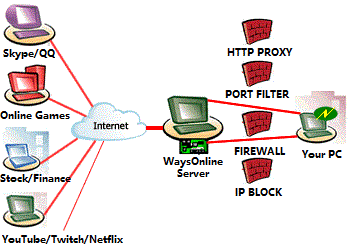
目前的网络通讯状况为众多的用户通过信息、内容供应商和接收交换信息,他们之间的数据传输由于通讯协议、转换格式和端口设置等原因往往未能达至通畅。
WaysOnline正是基于目前的网络通讯状况,利用多种通讯途径和技术自行研发出极具针对性的产品SocksOnline,其基于HTTP等网络
使用通讯协议TCP、UDP、 Socks、 HTTP等,在原本局域网或内部网不能直接使用的用户,而经过网联在线代理之后,就可以实现网上数据传输的通畅,Outlook收发外网邮件的、股票程序运行等。 |
| 1 . |
SocksOnline V2 的主要应用场合:(1.客户端 2.服务器端) |
| |
客户端的应用,目前为数众多LAN中的用户,由于上述的因素难于实现与外部网络的信息沟通,而通过我们SocksOnline代理服务器的通讯转换,就可让局域网或内部网的用户顺畅的实现与外部网络的通讯。如:可以在内部网QQ、ICQ通讯聊天、在线游戏、在线证券交易和各种BBS通讯等等。客户端应用如下图: |
| |
|
| 1.1 |
客户端功能简介 |
| |
提供端口映射、Socks4/4a、Socks5、HTTP代理等接口通讯代理服务。 |
| 1.2 |
客户端兼容系统 |
| |
支持Win9x,WinMe,WinNT4,Win2000,WinXP,Win2003。 |
| 1.3 |
使用前提条件 |
| |
IE已可以浏览一般网站,或可以使用FTP下载(只须符合其中一项)即可 |
| 1.4 |
客户端安装说明 |
|
考虑到用户使用的简单和易用,用户只需把软件下载下来直接运行即可,无需作 |
| |
任何安装,便可使用。 |
| 1.5 |
使用手册 |
| 1.5.1 |
帐号设置 |
| |
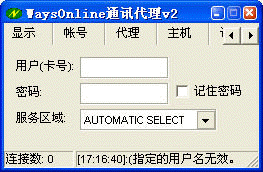
第一次运行或更改帐号设置,请选择[帐号]页填写。需要注意的是,V2必须填入有效(通过购买或在网站免费登记)的帐号,方能验证通过。否则,会有验证失败的错误提示。
输入帐号以后,需要重新启动V2。查看[信息]页可看到具体提示或错误信息。
 |
| |
|
| |
V2正常重起后,状态栏显示服务端口:
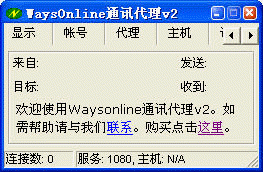
同时,系统托盘栏的小图标会由灰色变成绿色。表示系统已完成启动并准备就绪。若运行等待一段时间后,仍未启动正常,请转到[信息]页查看具体错误信息,同时检查配置是否正确,IE是否能上网。 |
| 1.5.2 |
代理设置 |
| |
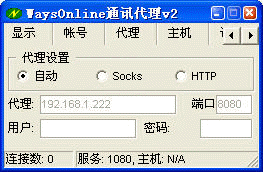
若V2能够启动不能使用或你是通过代理服务器上网,请在[代理]页检查代理服务器配置。SocksOnline
V2目前支持直接上网、通过HTTP代理或Socks代理上网三种通讯方式。一般情况下,选“自动“会根据用户的IE配置情况自动选择适合的配置。
但有时候内部网虽然不设置代理服务器,但会检查通讯格式,此时选"自动"认为直接上网方式,导致无法传输数据。请指定用HTTP代理,强制使用http通讯格式。指定"HTTP"代理还具有防断线功能,若你的网络频繁断线,也可以指定使用"HTTP"代理类型,代理地址和端口不填或为空即可。
 |
| 1.5.3 |
主机设置 |
| |
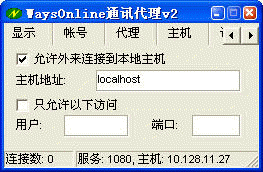
[主机]是V2新功能,通过SocksOnline V2,除了可以访问互联网外,也可以让互联网或其他SocksOnline
V2用户访问你的主机。譬如,可以开放自己的Web服务提供互联网访问,或者联网打游戏,设置办法可以参考网站上的案例。
首先要启用主机代理功能。将“允许到本地主机连接”的选项打勾。若你希望限定用户访问的端口或者指定访问的用户,请选中“只允许以下访问”,并指定用户名,或者指定端口。若指定多个,可以用,号隔开。
 |
| 1.5.4 |
服务设置 |
| |
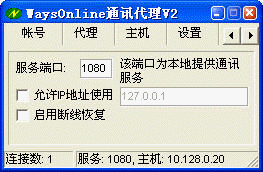
通过[设置]和[服务]页,可以修改系统的默认服务端口和启动相关的服务。
[设置]页
“服务端口”若启动时报端口只能使用一次,表示服务端口有冲突,不能使用导致启动 失败,可改成其他端口试试,如1081。
“允许IP使用”是让别的IP可以使用本机的SocksOnline
V2上网,IP指定可以用“-”号指定一段连续的IP段。不同IP以“,”分隔,例如: "192.168.1.2,192.168.1.10-192.168.1.89"
“启用断线恢复”是防止网络断线的断线恢复功能,启用了以后可以有效防止网络断线,但相应速度会有所降低,系统默认是灰色,并未完全开启。
尝试关闭该功能,若有部分应用关闭后不能正常使用,请恢复开启断线恢复。
[服务]页
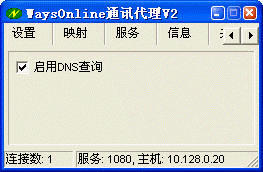
“启用DNS查询”是在本机建立DNS查询服务。启用了以后,只要在本机的DNS服务器里加入自己的IP或者“127.0.0.1”即可支持域名到IP的转换查询。
 |
| 1.5.5 |
映射设置 |
| |
[映射]支持将本地端口转换成Internet地址和端口。部分应用可能不支持Socks或Http代理接口,可以通过端口映射代理实现。如MS
Outlook不支持代理,可以将本机端口和email服务器做个映射,将本机变成email服务器。如:若要接收21cn.com的邮件,只要将本机“110”端口和21cn的邮件服务器"pop3.21cn.com:110",
通过建立映射关系,那么,Outlook只要收取"localhost:110",就能收到"pop3.21cn.com:110"的邮件了。
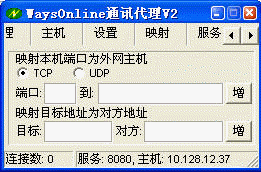
在“端口”输入本机端口号,“到”输入建立映射关系的internet服务器和端口,点击[增]按钮即可。删除映射时,输入端口号,[增]就会变成[删],点击[删]即可删除映射。[信息]页可查询已经建立了哪些映射。端口映射支持TCP或UDP的映射。
地址映射是通过映射改变连接的目标地址。如,将[192.168.1.22]改变为[10.128.11.27]可将目标为192.168.1.22地址重定向到Waysonline主机10.128.11.27。 |
| 1.5.6 |
查看信息 |
| |
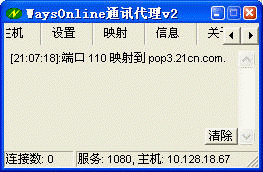
[信息]页存放使用过程中产生的错误或提示信息。若你遇到问题,可以看看[信息]页的内容提供判断问题所在。若无法解决求助时,请把[信息]页里的内容附上。
 |
| 1.5.7 |
关于说明 |
| |
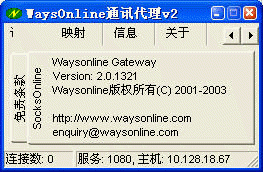
[关于]可以看到目前程序版本,以及使用时必须遵守的使用条款。
 |
| |
|
| 1.6 |
直接使用 |
| |
所有Waysonline服务器均支持Socks4/4a/5接口。只需将服务器地址填入软件的socks代理设置,可无需在客户端安装运行SocksOnline。服务器地址请向客服咨询或参考服务区划分说明 |
| |
|
| |
更多的资料,请参阅 案例精选 和 答疑精选。 |
| |
SocksOnline客户端的应用简介--结束-- |
|
|
| |
|
|
SocksOnline接入服务网关 |
|
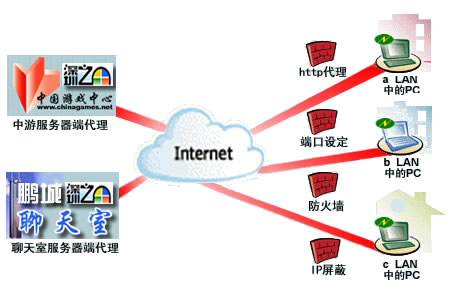
服务商通过设立专门的SocksOnline接入网关,令现有的系统支持各种代理,如HTTP代理。将用户群扩展到各机关、单位、学校等
具有消费能力的内网用户。拥有独立专业的HTTP接入网关,让自己客户拥有一个更稳定、高速、安全的使用环境。
深圳数据通信局中国游戏中心的HTTP网关接入示意图 |
| |
|
| |
|